Weather Forecast & Live Radar
- 4.7
- Rating
- 1.00M
- Installs
- Free
- Price
 Analysis by App-foxy
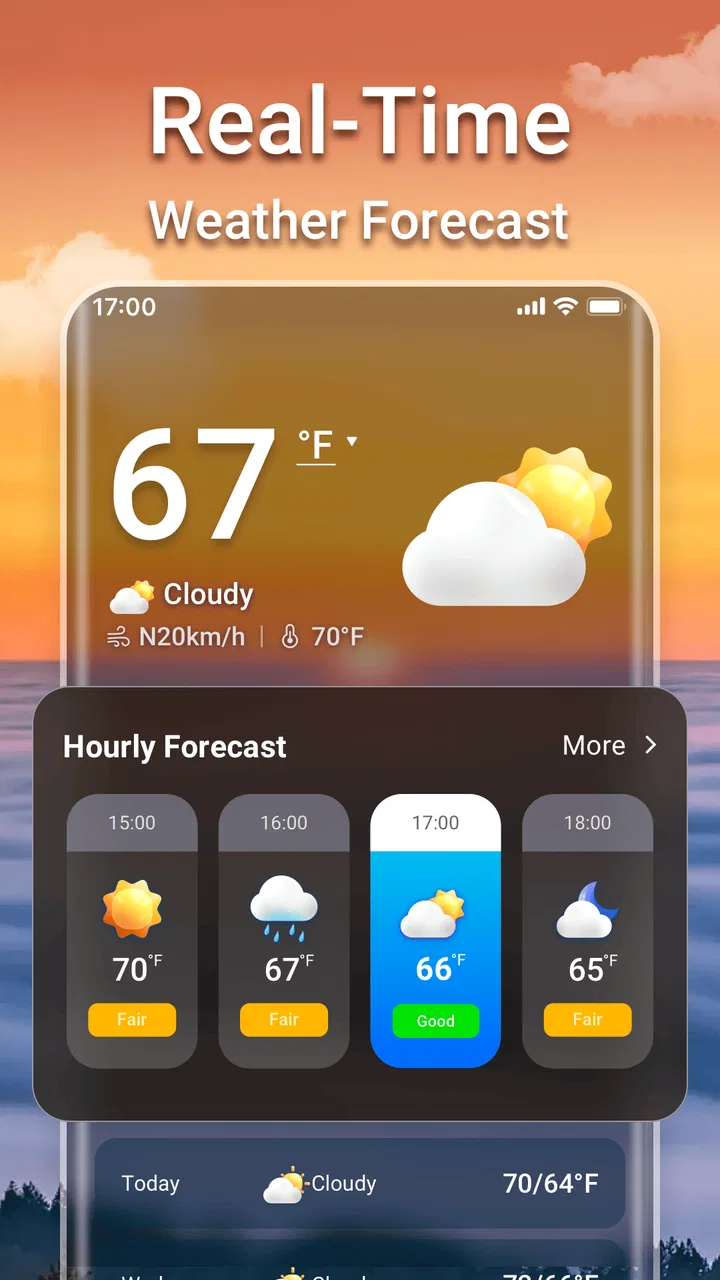
I use weather apps for small decisions that have surprisingly large consequences: whether to walk instead of drive, when to leave for an appointment, whether a jacket is enough, and if outdoor plans need a backup. Weather Forecast & Live Radar is built for those quick checks, combining daily and hourly forecasts with local and national air-quality information. In my experience, its strongest quality is not that it tries to replace every weather tool, but that it puts several useful answers in one place without charging for access.
The app comes from Weather 365 Days and sits in the weather category. It is free, rated for Everyone, and works on devices running Android 6.0 or later. The current version is 1.7.3. Its 4.7 average from around 32 thousand ratings and more than one million installs suggest that it has found a broad audience, and I can understand why: the basic purpose is easy to grasp, while the combination of short-term timing and air-quality context makes it more practical than a simple temperature display.
How the forecast behaves when your connection changes
The most important thing to understand is that a weather app is only as useful as the freshness of the information it can retrieve. Forecasts, radar views, and air-quality readings depend on current data, so the experience naturally changes when I move from a strong home connection to a crowded station, a weak mobile signal, or an area with poor reception. I would not treat the app as a guaranteed substitute for live access during a trip. Instead, I check the information I need before leaving and then use the app again whenever a reliable connection is available.
You May Also Like

 Blood Strike: 2.5 Anniversary
Blood Strike’s Loadouts Turn Every Drop Into a Tactical Gamble
A close look at Blood Strike’s custom loadouts: how fast access to signature weapons reshapes its battle royale rhythm, rewards preparation, and narrows the gap between fights.

 Pandora - Music & Podcasts
Pandora’s Music Is Easy to Start, but Harder to Recover
Pandora’s strength is its low-effort path from a seed to a station. Its weak spot is how much confidence it asks you to place in connection, setup, and quiet recovery.

 8 Ball Pool
 Is Built on Rivalries, Rematches, and Routine
A close look at the rivalries, rematches, shared routines, and unanswered safety questions that turn a quick pool match into a persistent mobile community.

 Samsung Music
’s Quiet Strength Is Playing What You Already Own
Its reach comes less from spectacle than from dependable access to a personal library. That simplicity is both the app’s strongest retention engine and its ceiling.

 AccuWeather: Weather Radar
AccuWeather Review: A Quick, Clear Forecast for Everyday Decisions
For everyday plans, the best forecast is the one you can understand quickly. AccuWeather makes rain timing, radar, and local conditions easy to act on, with a few trade-offs.

 Hill Climb Racing
Why Hill Climb Racing Still Turns Crashes Into One More Run
A tiny car, a bumpy hill and one more upgrade: Hill Climb Racing keeps resurfacing because its simple chaos makes every near-miss feel personal.
More From Our News Desk



That habit matters particularly for radar. A radar view is valuable because it helps answer a more immediate question than “Will it rain today?”: is precipitation approaching my location, and does the timing affect what I am about to do? If the connection is slow, the practical value of that view can be reduced because weather movement is time-sensitive. I prefer to load the relevant location before making a decision rather than waiting until I am already outside and trying to interpret a delayed screen.
Daily forecasts are more forgiving. Even when I only have a moment to check the app, a broad view of the day helps me plan clothing, errands, and outdoor time. Hourly information is more useful for decisions that are close to the present, such as choosing a departure window or deciding whether a short walk is sensible. I find the two views complementary: the daily forecast gives me the shape of the day, while the hourly forecast helps me choose a particular moment.
There is also a subtle trade-off between convenience and certainty. A forecast can look precise because it is presented hour by hour, but that does not mean every hour deserves equal confidence. I use the hourly view as a planning aid, not a promise. If the weather is changing quickly, I check again closer to the event. This is especially important when the result affects a long bike ride, an outdoor gathering, or a commute where there is little shelter.
Useful checks before leaving home
My preferred routine is simple. I open the app while I still have a dependable connection, look at the hourly conditions around the time I expect to travel, and then check the wider daily pattern. After that, I look at air quality if I am planning exercise or spending several hours outdoors. This takes less effort than opening separate tools, and it prevents me from relying only on the temperature.
Air quality is one of the app’s more useful additions because it changes how I interpret a pleasant-looking forecast. A cool, bright day may still be a poor choice for strenuous outdoor activity if local air conditions are unfavorable. I would not use the national view alone for a personal decision; the local reading is the one I pay attention to first. The national perspective is better for understanding broader conditions or comparing places before traveling.
One practical tip is to compare the hourly forecast with the actual reason for checking it. If I am deciding whether to carry an umbrella, precipitation timing matters more than the day’s average temperature. If I am choosing a running route, air quality and the warmest part of the day may matter more. The app becomes more useful when I avoid treating every displayed detail as equally important.
Using it during commutes, errands, and short trips
The app fits especially well into mobile situations where I need an answer quickly. Before a morning commute, I can check whether conditions are likely to change between leaving and returning. Before an errand, I can compare the next few hours rather than making a decision from the current sky alone. For a short trip to another place, I use the local forecast for the destination instead of assuming that nearby areas will behave identically.
Connectivity can shape these moments. At home, the app feels like a planning screen. On the move, it becomes more of a decision checkpoint: I open it at a station, outside a café, or before leaving a building. If the connection is unreliable, I avoid repeatedly refreshing while walking. A better workflow is to check once, note the important timing, and reassess later when the network improves. That saves frustration and keeps the app from becoming a distraction.
For travelers, I would check both the departure and destination locations before setting out. A forecast that is useful for the first half of a journey may not describe the conditions at the other end. The national air-quality view can add context when moving between regions, but I still give priority to the local reading for whatever activity I will actually do there.
Families may also find the app practical because the Everyone rating makes it suitable for a wide audience. I can imagine using it with a child before a school walk or a day at a park: look at the hourly conditions, explain why the plan may shift, and check again before leaving. The app does not remove uncertainty, but it makes the conversation more concrete than simply guessing from the window.
What happens when information is late or conditions change
Weather apps are often judged at the exact moment they are needed most, which is also when network problems and rapidly changing conditions can be most irritating. If a radar view takes too long to appear, I do not keep tapping the same control. I switch to the daily or hourly information already available, make a conservative decision, and revisit the radar later. For a safety-sensitive situation, I would rather delay an outdoor plan than interpret incomplete information as reassurance.
When a forecast changes between checks, I treat that as a reason to adjust my plan rather than as evidence that the app is useless. Forecasting is an evolving estimate. The useful question is whether the new information changes my decision. If rain is now expected during a walk, I may shorten the route or move it earlier. If air quality has become a concern, I may choose an indoor activity. This is where the app’s multiple views work better together than a single daily icon.
A realistic example is a weekend market visit. In the morning, I might see a comfortable temperature and decide to go on foot. Before leaving, the hourly view could show a less convenient period later in the day, while the radar view suggests approaching precipitation. I would then carry rain protection, change the return time, or use transport for the way back. The app does not make that decision for me; it gives me enough context to avoid being surprised.
There is a limitation here: users who expect a weather app to provide constant certainty may be disappointed. The display can organize the information, but it cannot control the quality or stability of the connection, and it cannot guarantee that a forecast will remain unchanged. I consider this a normal limitation of live weather tools, but it is worth remembering before relying on one for a remote hike or a long journey.
Keeping mobile use sensible
I am careful about how often I refresh weather information on mobile data. A quick check before leaving is usually more useful than repeatedly reopening the same forecast every few minutes. I focus on the location, time window, and information type that match my decision. If I only need to know whether the evening will be colder, I do not spend time studying a radar view. If I am planning exercise, I check air quality as well as temperature.
This selective approach makes the app feel less demanding. Instead of treating it like a screen that must be monitored continuously, I use it in stages: plan before leaving, verify when conditions are uncertain, and check again if the situation visibly changes. It is a good workflow for people who want timely information without turning their phone into a permanent weather monitor.
Location choice also deserves attention. For an ordinary day, the local forecast is the natural starting point. For travel, I switch my attention to the destination before I need the information. For a wider comparison, the national air-quality view is more appropriate than repeatedly checking a single local point. Thinking in terms of purpose keeps the app’s several information layers from becoming clutter.
I would also avoid making a decision from one number alone. Temperature, precipitation timing, and air quality can point in different directions. A mild temperature does not automatically mean comfortable conditions, and a clear-looking daily summary does not answer every question about a particular hour. The app is most effective when I read the forecast as a small set of clues rather than a single verdict.
Who will appreciate it, and who may prefer another tool
I would recommend this app to someone who wants a straightforward free weather companion with both daily and hourly planning, plus air-quality information in the same experience. It is a good fit for commuters, parents organizing outdoor time, travelers comparing locations, and people who want to consider air conditions before exercising. Its broad adoption and strong average rating also make it an easy option to try without a financial commitment.
I would be more cautious about recommending it as the only tool for specialized needs. Someone who requires highly technical meteorological analysis, detailed storm tracking, or a professional forecasting workflow may prefer a service built specifically for that purpose. Likewise, a person who needs dependable access in places with weak connectivity should plan ahead and avoid assuming that a live radar screen will always be available at the critical moment.
The app is also not the best choice for someone who wants weather information to disappear entirely into the background. My experience is more hands-on: I open it, select the relevant view, and interpret the result. That is a strength for people who want control, but it may feel less convenient to users who expect every update to arrive automatically without any checking.
My verdict after using the full set of views
Weather Forecast & Live Radar earns its place as a practical everyday weather app because it connects three useful questions: what the day may look like, when conditions may change, and whether the air is suitable for the activity I have planned. The free price removes the main barrier to trying it, and the Everyone rating makes it approachable for households rather than a niche audience.
Its biggest strength is the way it supports decisions instead of displaying weather as decoration. I can use the daily view for an overview, the hourly view for timing, radar for approaching precipitation, and air-quality information for outdoor health choices. The trade-off is that these tools are most valuable with a working connection and sensible interpretation. I would check ahead, avoid over-refreshing on mobile data, and keep a backup plan for important outdoor activities.
For ordinary commutes, errands, walks, and short trips, I find that balance convincing. It does not eliminate uncertainty, but it gives me a clearer basis for adapting to it. If you want a free weather app that brings local and national air-quality context together with short- and medium-term planning, this is a sensible choice. If your priority is expert-level analysis or guaranteed access away from a network, I would look for a more specialized companion rather than relying on this one alone.
FAQs for Weather Forecast & Live Radar
01What features does the Weather Forecast & Live Radar app offer?
The Weather Forecast & Live Radar app provides real-time weather updates, a 7-day forecast, live radar images, and severe weather alerts. It also includes features like hourly updates, temperature predictions, and wind speed data. Users can customize notifications and view detailed maps for precise weather tracking.
02Is the Weather Forecast & Live Radar app free to use?
The app is available for free download, offering basic features without charge. However, it includes in-app purchases and subscription options for advanced features, such as ad-free usage, extended forecasts, and enhanced radar capabilities. Users can choose a plan based on their needs.
03How accurate is the weather data provided by the app?
The app aggregates data from multiple reliable sources, ensuring high accuracy in its forecasts. It uses advanced algorithms to deliver precise weather updates and live radar information. While no weather app can guarantee 100% accuracy, this app is known for its dependable performance and timely updates.
04Can I customize notifications and alerts in the app?
Yes, the app allows users to customize notifications and alerts according to their preferences. You can set alerts for severe weather warnings, daily forecasts, or specific conditions like rain or snow. This customization ensures users receive timely information relevant to their location and interests.
05Is the app compatible with both Android and iOS devices?
The Weather Forecast & Live Radar app is fully compatible with both Android and iOS platforms. It is regularly updated to ensure smooth performance across various devices and operating systems. Users can download it from the Google Play Store or the Apple App Store, ensuring broad accessibility.
Pros
- Accurate real-time weather updates.
- Interactive radar maps with zoom.
- Customizable weather alerts.
- User-friendly interface design.
- Supports multiple locations.
Cons
- Ads can be intrusive at times.
- Limited offline functionality.
- Some features require subscription.
- Occasional data update delays.
- Battery usage can be high.

Weather Forecast & Live Radar
Gallery